


The Annual Requirement of an asset is a recommended yearly investment amount required to maintain the asset. Citywide calculates the annual requirement using the Replacement Cost of the asset and the Lifecycle EUL (the financial Estimated Useful Life is used if a Lifecycle EUL has not been entered on the profile). The information can be viewed at the asset level on the Profile screen as well as reported on using the Annual Requirement report.
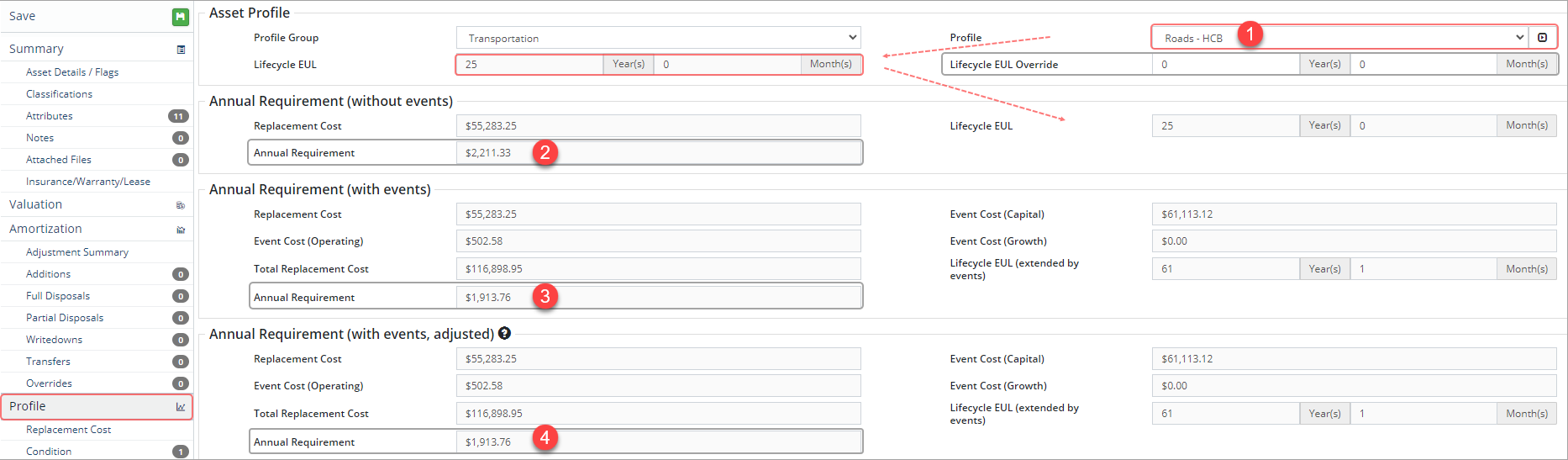
The screenshot above shows the Profile assigned to the asset ❶. Within the profile, a Lifecycle EUL of 25 yrs has been defined. To override the Lifecycle EUL for the current asset only, enter a value in the Lifecycle EUL Override field. In the Annual Requirements (without events) section we see the annual investment requirement for this asset is $2,211.33 ❷.
Replacement Cost / Lifecycle EUL = Annual Requirement
However, the asset belongs to a profile with a lifecycle strategy that includes lifecycle events. Generally, lifecycle events extend the life of the asset and so the annual requirement calculation will include any added events and be divided by the extended EUL. In the example above, the Annual Requirement (with events) now shows $1913.76 ❸ as the annual investment requirement for this asset.
Total Replacement Cost / Lifecycle EUL (extended by events) = Annual Requirement
The total replacement cost is the Replacement Cost ($55,283.25) of the asset plus Event Cost (Capital) ($61,113.12), Event Cost (Operating) ($502.58), and Event Cost (Growth) ($0.00) divided by the Lifecycle EUL (extended by events) (61.1). Event costs will be substituted with costs from scheduled lifecycle events when applicable and shown in the Annual Requirement (with events, adjusted) ❹ section. Non-strategy and skipped events will not have an impact on the requirement's EUL or Lifecycle EUL divisor.
The Annual Requirement report provides a summary of the annual dollar requirement needed to maintain infrastructure. The report can also include Lifecycle events. To report on the annual requirement of assets:
- Click Assets ð Reports ð Asset Management.
- Click Annual Requirement.

- Click Group By and select Classification, Profile, or Asset.
- Select a Primary/Secondary Classification (i.e., AMP Category/AMP Segment) or Profile (i.e., HCB Roads).
- The Include Lifecycle Events flag defaults to Yes which will calculate the annual requirement based on total replacement cost (replacement cost plus lifecycle events) and the extended lifecycle EUL (Lifecycle EUL extend by events).
- Click Run Report.
- Apply filters as needed. Options will depend on selections made in the previous screen.

- Enter a reporting Year.
- Click Display Options to adjust # of decimal places within the report.
- Click Modify Report to Use Adjusted Event Costs or to filter the event costs by Funding Source.
- Click Run Report.
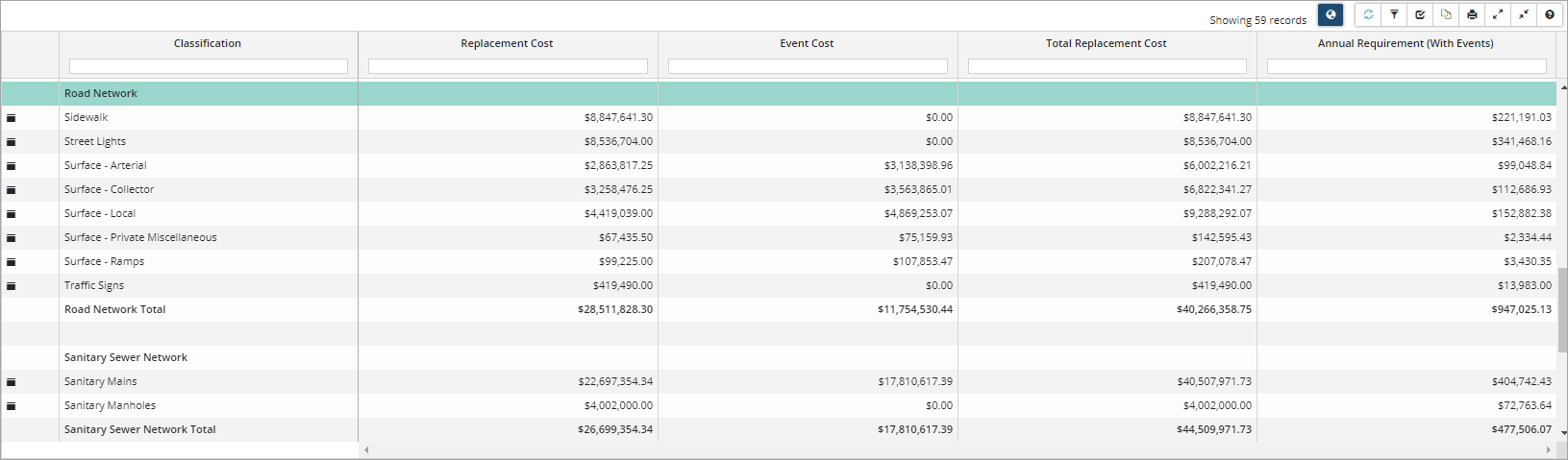
- Once generated the report can be exported as a CSV file to Excel
 or to PDF
  using the buttons on the toolbar.


