

Zoning

Last updated: Jan 22, 2026
Overview
All municipalities will have various zoning regulations that involve both a name and a zoning code. This is the place where these details are set out for use within Properties in Citywide.
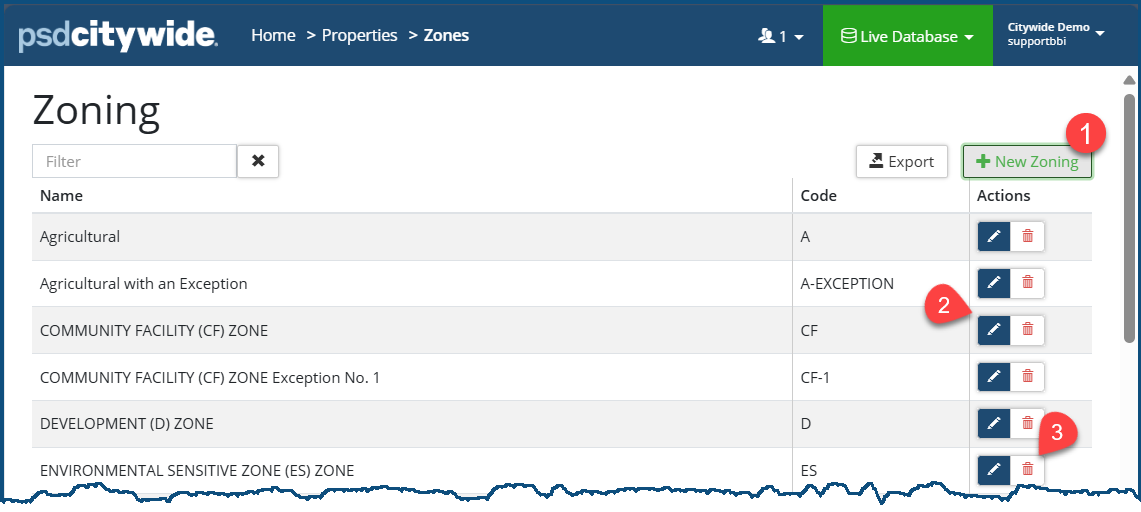
To add a new Zoning:
- Click +New Zoning ❶. The New Zoning dialog box appears:
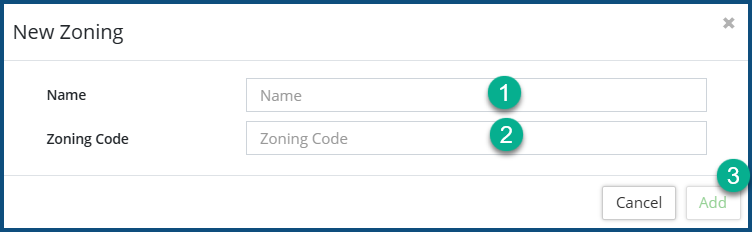
- Enter a Name ❶ for the new zoning classification.
- Add a Zoning Code ❷.
- Click Add ❷.
To edit a Zoning and/or the Zoning Code, click the Edit icon  ❷.
❷.
❷.To delete a Zoning, click he delete icon  ❸.
❸.


