A Class defines the structural framework of a Dataset. It determines how data is organized and stored in CWBC.
Multiple Classes may exist within a single CWBC database. Typically, separate Classes are maintained for different planning areas, such as:
- Operating
- Capital
Each Class is made up of two core components:
- Class Columns – configurable columns that define what type of data is captured (e.g., monthly budget amounts).
- COA Class Keys – rows representing account items from the Chart of Accounts (such as General Ledger account numbers).
Together, the Class Columns and COA Class Keys form a structured grid. This grid acts as a template that determines how data is stored in CWBC.
For example, in a simple Operating Class:
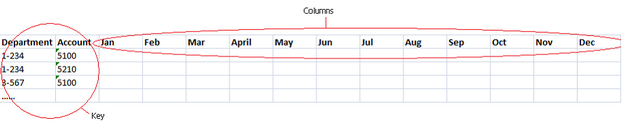
- Columns may represent periods in a year (e.g. January, February, March... December).
- Rows represent individual Account Numbers (COA Class Keys).
The cell intersection of each row and column stores a single data value, usually representing a budget or actual transaction or balance amount.
Important Class Design Principles
- Classes store data only.
- Classes do not contain calculated rows or calculated columns.
- Any calculations (totals, variances, derived metrics, etc.) are defined in Views, not within the Class itself.
- Calculated fields are dynamic and do not represent stored (persisted) data.
A Class defines the database data structure only — it does not define Years or Datasets.
An example of a simple Operating Class, where monthly budget data will be stored in columns (Class Columns), against rows defined by Account Numbers (COA Class Keys), is illustrated in the table below.