

Working with Salary Plan Operations - Copy Data to another Dataset / Year

Last updated: Sep 11, 2026
Copy Data to Another Data Set / Year
To maximize efficiency, a Copy Operation is provided to allow users to copy Salary Plan data from one Dataset to another. This is distinct from the Rollovers operation available on the Citywide Budgeting home page and only applies to Salary Plan data.
Procedure
- Open the Copy Data to Another Dataset / Year Operation in Salary Plan.
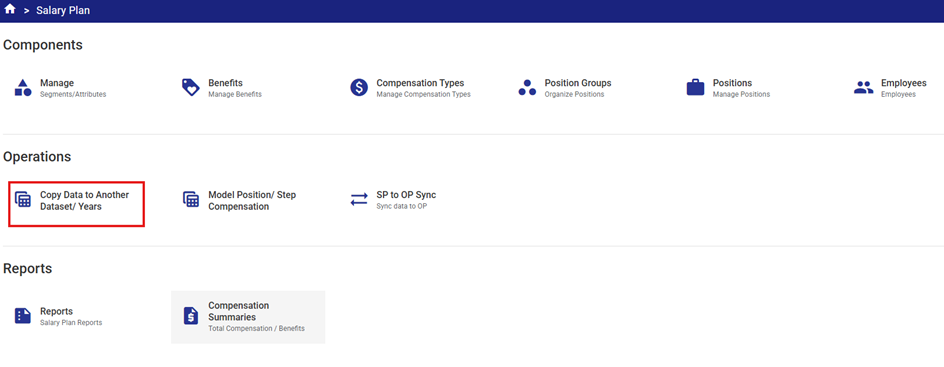
The Operation properties interface will be displayed.
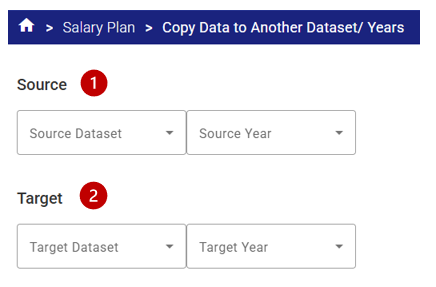
- Select the Source Data Set and Source Year from the drop-down lists. The Source is the source data to be copied FROM
 .
. - Select the Target Data Set and Target Year from the drop-down lists. The Target is the destination to be copied TO
 .
.
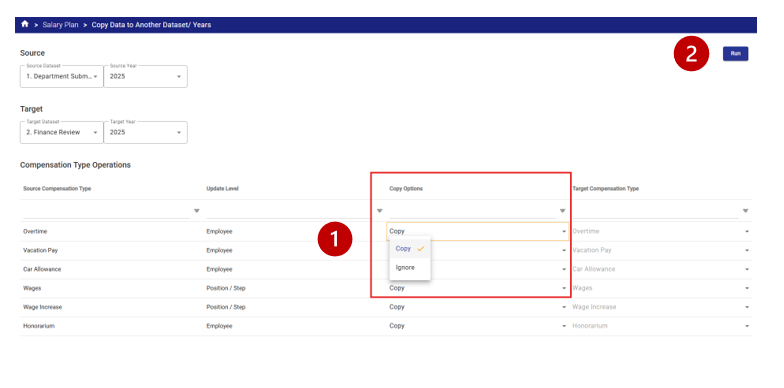
- Once selections have been made, a list of configured Compensation Types along with their Update Level and available Copy Options will be displayed.
Copy Options include:
- Copy – copies the compensation information (annual or hourly rates, overridden compensation amounts etc.) from the Source to the Target exactly. This is the default and used in most cases.
- Merge – available only for Position /Step compensation types, this option merges the compensation information together with a target compensation type.
- This is typically used for clients doing incremental budgeting (where they prefer to track the increases separately from the base wages and therefore have two compensation types that combine to be a total compensation amount (i.e. Wages and Wage Increases)).
- Where this technique is used, when Salary Plan models are rolled over from one year to the next, the merge option will combine the base Wage Compensation type and the Increase Compensation Type together into the Wage Compensation to form a new increased base wage amount for the next year.
Example – in 2025 the Wage Amount was $25.00 per hour and the Wage Increase amount was $0.50 per hour. If the merge option was selected, the system would add the two together when the Copy Operation is run, and the 2026 Wage Amount would become $25.00 + $0,50 = $25.50.
- Ignore – ignores the compensation information (annual or hourly rates, overridden compensation amounts etc.) in the Source and does not bring any information forward to the Target. Compensation amounts will be blank in the Target after the operation is run.
Select the appropriate Copy Option for each Compensation Type  , then click Run
  to execute the Copy Operation.
Note – Dataset lock (System Administration > Dataset Locks) can be used to prevent changes in Salary Plan.
Related Articles: Citywide Budgeting - System Administration - Dataset Locks


