


Ever wondered how Decision Support analyzes the data to help make asset lifecycle event decisions? This article outlines what Decision Support is doing in the background.
How a Scenario is Calculated
Decision Support simulates your portfolio one month at a time. Each month, every asset loses some condition. Upcoming Lifecycle Events on each asset are then ranked by how much condition is raised per dollar spent, as well as the assets overall cost. The algorithm starts at the most efficient events on the most costly Assets and moves through the list until the year's budget runs out.
A scenario is four things: a set of assets, a budget per year, an optional condition goal, and an end year (up to 100 years out). DS steps through every month from the current year to the end year. In each month it does five things:
- Ages every asset along its deterioration curve.
- Determines each asset's Lifecycle events that are upcoming and valid.
- Ranks each Lifecycle event across the portfolio by cost efficiency.
- Funds or defers each item in ranked order, against the remaining budget and the condition goal. Each asset can have one event funded each month normally, and up to 2 events funded in the final month if Event Look Ahead is turned on.
- At year end, records spending, condition and risk for every asset and for the network as a whole.
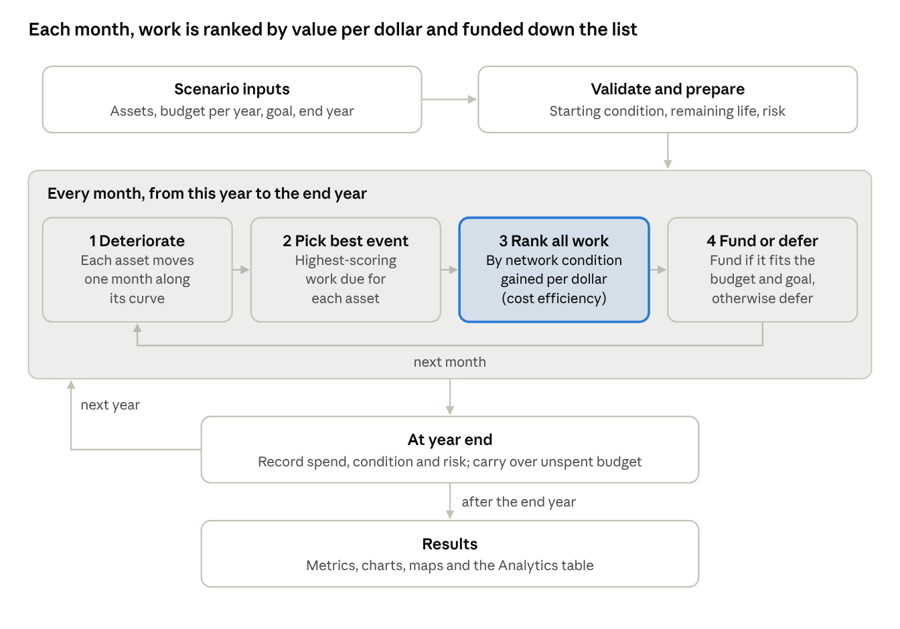
Image 1 above: Decision Support simulation loop · 4 monthly steps, repeated each year
Every number on the Metrics, Charts, Maps and Analytics pages comes out of this loop. The sections below explain each step's math in the order DS runs it.
This guide uses the following conventions:
- Condition is a percentage: 100% is new and 0% is end of life.
- RC is an asset's replacement cost.
Building Blocks: Condition and age as fractions
Inside DS, condition and age are both fractions between 0 and 1, so that every asset class can be compared on the same scale.
Age ratio
The age ratio is how far an asset is through its life:
Age ratio = months in service ÷ lifetime months (EUL)
For example, a 20-year asset (240 months) that has been in service for 60 months has an age ratio of 60 ÷ 240 = 0.25.
Condition ratio
The condition ratio runs from 1.0 (new) to 0.0 (end of life). Some profiles are scored on another scale, such as 1 to 5. Those scores are converted to the 0–1 scale first:
Condition ratio = (score − min) ÷ (max − min)
For example, a 3.5 on a 1–5 scale becomes (3.5 − 1) ÷ (5 − 1) = 0.625. When a profile's scale runs the other way (1 is best), the result is flipped: 1 − ratio.
Starting condition is set as follows:
- If the asset has a condition assessment, its latest assessment is used and aged forward to today.
- If there is no assessment, condition comes from age alone, read off the asset's deterioration curve (next section).
- Scenarios start from the current calendar year and not the inventory year.
An assessment also resets the asset's clock. DS works out the age that matches the assessed condition on the curve, and the asset's remaining life is recalculated from that age:
Months left = lifetime months × (1 − age ratio)
Curved profiles round the months used up, so remaining life comes out in whole months.
Deterioration Curves: How condition falls with age
Each asset profile can set a deterioration curve, which converts an asset's age into a condition. The curve sets how quickly condition falls at each stage of the asset's life based on proprietary functions. Each asset deteriorates along the curve selected on its profile, which is one of:
- Straight line
- Quarter circle
- Quadratic
- Cubic
- Road: HCB
- Road: LCB/ICB
- Road: gravel
- Asphalt
- Concrete
The monthly step. Each simulated month, DS moves the asset one month along its curve. The condition lost is the difference between today's condition and the curve's value one month later:
Deterioration = condition now − condition next month
Worked example. Take a 20-year asset (240 months). The table shows how many condition points it loses in one year at three points in its life:
|
Point in life |
Straight line |
Quadratic |
|
10% used (year 2) |
5.0 |
1.3 |
|
50% used (year 10) |
5.0 |
5.3 |
|
90% used (year 18) |
5.0 |
9.3 |
A straight-line asset loses the same 5 points (1/20) every year. A curved asset loses little early and much more late in life, which pushes its need for work towards the end of its life.
How Work Changes Condition
Every event in a lifecycle strategy or decision tree has an impact method, and that method decides how much condition the work restores. Condition can never go above 100%.
|
Impact method |
What happens to condition |
Example (asset at 40%) |
|
Condition After Event |
Condition is set to the event's value |
Set to 85% → 85% |
|
Added Condition |
The event's value is added, capped at 100% |
Add 30% → 70% |
|
Added EUL (years) |
Adds N years of remaining life, then reads the new condition off the curve |
See below |
|
Replacement |
The asset starts over at 100% with a new in-service date and a new life |
→ 100% |
|
No impact |
Condition does not change; the cost can still be included |
→ 40% |
Added EUL (years):
The added years extend the asset's remaining life, and the new condition is read off its curve at the new age. For example, take a 20-year straight-line asset at 40% condition:
- It has 8 years of life left.
- An Added EUL of 5 years gives it 8 + 5 = 13 years left.
- With 13 of its 20 years remaining, it is now 35% of the way through its life.
- On a straight line, 35% of life used means a condition of 65%.
If the added years would give the asset more life than when it was new, its life is extended to match, so condition tops out at 100%.
Replacement resets three things:
- the asset's in-service date;
- its replacement cost (to the replacement event's cost);
- its whole future event schedule, which is rebuilt from the replacement date.
Network Average Condition
The headline condition of your network is weighted by replacement cost, instead of being per asset. A $2M road counts four times as much as a $500K road when considering similar events.
Network average = Σ(condition × RC) ÷ Σ RC
Worked example: Three assets, $4.0M total replacement cost
|
Asset |
Replacement cost |
Condition |
Weight (RC ÷ total) |
Weighted condition |
|
Arterial road |
$2,000,000 |
40% |
0.500 |
20.0% |
|
Collector road |
$1,500,000 |
70% |
0.375 |
26.25% |
|
Gravel road |
$500,000 |
90% |
0.125 |
11.25% |
|
Network |
$4,000,000 |
|
1.000 |
57.5% |
A simple average of the three conditions would be 66.7%. The weighted figure, 57.5%, is lower because the largest asset is in the worst shape.
Decision Support reports both figures:
- Network average condition (and network average risk) uses the replacement-cost weighting above. It drives the condition goal, the Condition chart and the scenario Metrics.
- Average condition (and average risk) in the Analytics inspector is a simple average across active assets.
Event Prioritization: The Cost-efficiency Score
The events are first prioritized by type:
- Replacement
- No-Impact Events
- Previously deferred events
- All other event types
Events in each group are then prioritized on cost efficiency:
Cost efficiency = (condition gain × asset weight) ÷ event cost
- Condition gain: the asset's condition after the work minus its condition before
- Asset weight: the asset's share of the replacement cost of all assets active that month.
- Event cost: the monetary cost of the work.
Worked example: The three assets from the previous section, on a 0–100 profile, with $4.0M network RC.
|
Work |
Condition change |
Gain |
Asset weight |
Cost |
Efficiency |
Rank |
|
Collector road resurfacing |
70% → 85% |
15 |
0.375 |
$120,000 |
46.9 |
1 |
|
Arterial mill and overlay |
40% → 85% |
45 |
0.500 |
$600,000 |
37.5 |
2 |
|
Gravel road reconstruction |
90% → 100% |
10 |
0.125 |
$500,000 |
2.5 |
3 |
The arterial mill and overlay event has the biggest single gain, but the collector resurfacing gains more condition per dollar spent, so it is funded first.
Zero-cost events cannot be divided by their cost. They are scored on their weighted gain alone, which normally puts them at the top of the list.
Budget Allocation
DS checks the ranked list from the top and funds every item that still fits in the year's remaining budget. An item that doesn't fit is deferred to a future year, but as DS keeps going, a smaller item further down can still be funded.
Worked example: $700,000 annual budget, five ranked items
|
Rank |
Work |
Cost |
Fits? |
Decision |
Remaining after |
|
1 |
Collector road resurfacing |
$120,000 |
Yes |
Funded |
$580,000 |
|
2 |
Arterial mill and overlay |
$600,000 |
No |
Deferred |
$580,000 |
|
3 |
Local road patching |
$250,000 |
Yes |
Funded |
$330,000 |
|
4 |
Gravel road reconstruction |
$500,000 |
No |
Deferred |
$330,000 |
|
5 |
Residential road crack sealing |
$80,000 |
Yes |
Funded |
$250,000 |
Three items are funded for $450,000 in total, two are deferred, and $250,000 is left over.
Annual Rollover Budget. With this on, unspent money carries into next year. In the above case, the $250,000 remaining would be added to next years Budget
Deferred work is re-scored the next month at priority while still deteriorating.
Unlimited budget. A year with no budget value is unlimited, and every item is funded.
Inflation on the budget. On the budget screen, an inflation rate compounds the starting budget forward one year at a time.
With Look Ahead turned on, budget left over at the end of a year is spent on future events that assets already qualify for. Without it, that money is left unspent or rolls over.
After the last month of each year, DS makes one extra pass through the portfolio:
- Find the next event. For each asset, DS looks at the next event on its schedule in a future year. Only that one event is considered for each asset.
- Check the asset already qualifies. The event is only pulled forward if the asset's condition, age, remaining life, or risk meets the event's triggers. If the asset doesn't qualify, the event stays on its original date.
- Rank the candidates. DS prioritizes Assets that had no work funded this year then ranks those events by cost efficiency as usual. Afterwards, Assets with work done this year get the same treatment.
- Fund what fits. Each event is funded if it is within budget for the year, and the scenario is still under the condition goal (while Maintain Condition Goal is checked).
- Ignore what doesn't fit. If a valid look ahead event cannot be funded it is not considered deferred and stays at its original date.
- Record the result. A funded event is moved from its future date into this year. In the Analytics inspector it's labelled "Look Ahead Event".
Assets are adjusted to show those events were planned for the current scenario year. DS then continues on to the next year as normal.
Maintain Condition Goal
The condition goal is a target for the network average condition, entered as a percentage (for example 70%). By default it is a reference line: the Condition chart shades green above it and red below it, and spending is not affected.
With Maintain condition goal turned on, the goal also limits spending. Before funding each ranked item, DS checks that the network average is:
- Above the goal: the item is deferred, even if budget is available.
- At or below the goal: the item goes on to the normal budget check. If it is funded, the network average is recalculated to include its gain.
Example. The condition goal is 70%. Our scenario has two roads with the same replacement cost: Road A is at 60% and Road B is at 70%, giving a network average of 65%.
- Road A is resurfaced up to 80%. This raises the network average to 75%, which is above the condition goal of 70%.
- Road B's work is next, but it is deferred because the network is already above the condition goal, even though there is budget left over.
- Both roads deteriorate through the year. Once the network average falls back below 70%, Road B's work becomes eligible again.
The result is that Maintain condition goal keeps the network close to the target and leaves the remaining budget unspent. That money then rolls over if Annual Rollover Budget is on.
Risk: Probability and Consequence of Failure
Each asset's risk is its probability of failure (PoF) combined with its consequence of failure (CoF). Each is a rating from 1 (low) to 5 (high). Your Citywide can use one of two methods:
|
Method |
Formula |
Range |
Example (PoF 4, CoF 3) |
|
Multiplicative (default) |
PoF × CoF |
1–25 |
12 of 25 |
|
Additive |
PoF + CoF |
2–10 |
7 of 10 |
Risk is recalculated at the end of each simulated year, rising as certain inputs change: condition, age, and remaining service life. So risk tends to rise as assets deteriorate, and fall after work restores them.
How PoF and CoF are built. Each side is scored from metrics set up on the asset's profile:
- Tier value of each metric. Each metric gets a rating from 1 to 5 using the profile's tier thresholds.
- Weight of each metric. Each metric value accounts for a percentage of the overall classification score based on the metric's Weight
- Weight across classifications. The classification scores are combined based on their individual weight to create a final score
Worked example: CoF for Sanitary Mains
|
Metric |
Classification (weight) |
Metric weight |
Tier rating |
Contribution |
|
Replacement Cost |
Economic (60) |
100 |
4 |
4 × 100/100 = 4.0 |
|
Pipe Size (mm) |
Physical (40) |
70 |
3 |
3 × 70/100 = 2.1 |
|
Material |
Physical (40) |
30 |
2 |
2 × 30/100 = 0.6 |
- Economic score = 4.0
- Physical score = 2.1 + 0.6 = 2.7
- CoF = (4.0 × 0.6) + (2.7 × 0.4) = 3.48
- With a PoF of 4, Risk rating = 4 × 3.48 = 13.9 of 25
Network average risk is weighted by replacement cost, in the same way as network average condition. The Risk chart and the risk maps sort each asset into your configured risk tiers by its score.
Glossary and Quick Reference
|
Term |
Meaning |
|
EUL |
Estimated useful life, in months |
|
Age ratio |
How far through its life an asset is |
|
Condition ratio |
Condition from 1.0 (new) to 0.0 (end of life) |
|
Deterioration curve |
Profile setting that maps age to condition |
|
Monthly deterioration |
Condition lost in one month |
|
RC |
Replacement cost of an asset |
|
Asset weight |
An asset's share of network value |
|
Network average condition |
Value-weighted condition of the portfolio |
|
Cost efficiency |
Network condition bought per dollar; sets the funding order |
|
Deferral |
Work that was due but not funded, because of budget or the condition goal |
|
Rollover |
Unspent budget carried into next year |
|
Budget inflation |
Growth of the default budget |
|
PoF / CoF |
Probability / consequence of failure, each rated 1–5 |
|
Risk |
Combined risk score |


