


Spaces can be incorporated into the iFrame, allowing users to identify the physical location/Space associated with a Service Request. This provides a convenient way for staff or other end users to submit requests through a portal while maintaining the connection between the Service Request and the organization's configured Space hierarchy.
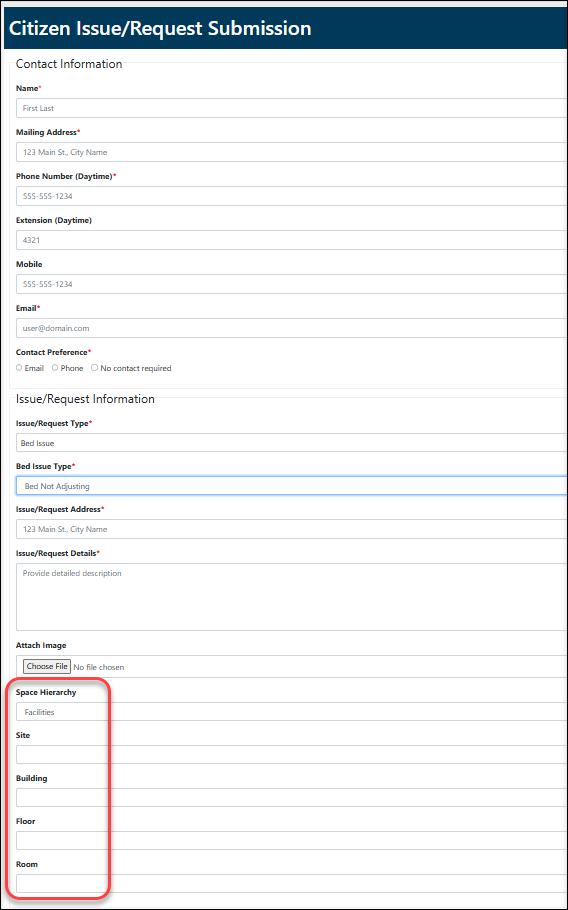
The iFrame request form can include Space fields that allow the user to select the location associated with their request:
- Request Type: Repair
- Issue: Bed is not adjusting
- Site: Retirement Home
- Building: Happy Retirement Home
- Floor: Floor 2
- Room/Unit: Unit 8
The selected Space becomes part of the submitted service request. Once the request is submitted, the service request record in Citywide Maintenance contains the associated Space information.
The fields displayed in the iFrame can change based on the organization's Space configuration. A facilities organization may use building-oriented levels such as Site 🢡 Building 🢡 Floor 🢡 Room.
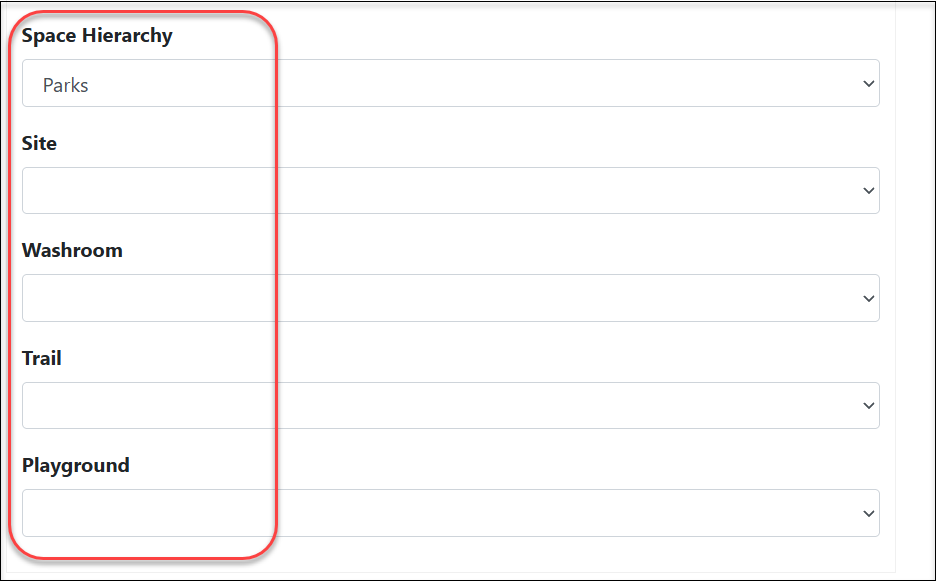
A parks organization might use different levels, such as Site 🢡 Washroom 🢡 Trail 🢡 Playground.
Space Selection: Mandatory or Optional in iFrame:
An important configuration consideration is whether the Space should be required/mandatory when completing the request in iFrame. Adding Space fields does not necessarily make the Space mandatory. If an organization requires submissions to include location, the appropriate configuration should be reviewed to determine whether:
- The overall Space selection is mandatory.
- Specific levels of the hierarchy are mandatory.
- Only certain Space levels are required.
Submitted iFrame request in Citywide Maintenance:
Once a request has been submitted through the iFrame, the Service Request can be accessed in Citywide Maintenance. The associated Space information allows Maintenance staff to identify where the issue is located. From the Spaces area, users can then locate the Space and view the Service Request associated with it.


